


Arxon
Administrators
-
Joined
-
Last visited
Everything posted by Arxon
-
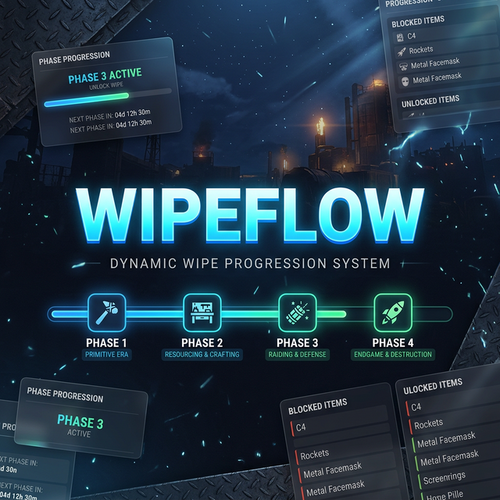 WipeFlow — Wipe Director + Elite UI Version: 1.0.0 Author: WipeFlow Team Compatibility: Oxide/uMod + Carbon Description WipeFlow is a comprehensive wipe progression system for Rust servers. It automatically manages the entire wipe lifecycle through configurable phases, dynamic item restrictions, gather rate scaling, unlock milestones, scheduled events, and a premium in-game UI — all from a single plugin. Instead of managing dozens of separate plugins for gather rates, item blocking, wipe scheduling, and event management, WipeFlow unifies everything into one streamlined, highly configurable system. Key Features Automatic Phase Progression — Define up to 6+ phases with percentage-based or time-based transitions. The server automatically advances through phases as the wipe progresses. Item Blocking & Workbench Restrictions — Block specific items (explosives, rockets, etc.) and limit workbench tiers per phase. Items are blocked from crafting, researching, and deploying. Dynamic Gather Rates — Set independent gather multipliers (wood, stone, metal, sulfur, cloth) for each phase. Rates automatically change on phase transitions. Recycler & Crafting Control — Adjust recycler yield and crafting speed multipliers per phase. Global Unlocks — Define milestones triggered by wipe percentage or global metrics (e.g., total scrap recycled by all players). Unlocks can change rules, unblock items, trigger events, or broadcast messages. Automated Events — Schedule airdrops, gather bonuses, and server-wide announcements based on time windows, player count, and phase restrictions. Premium In-Game UI — A sleek, dark-themed panel with 8 tabs: Overview, Timeline, Info, Rules, Unlocks, Events, Progress, and Settings. Includes a pinnable mini-HUD. Multi-Language Support — Built-in translations for Spanish, English, French, Russian, and Portuguese. Auto-detects player's Steam language. Preset System — Save and apply server configurations as presets. Auto-apply on wipe for consistent server restarts. Config Validator — Built-in validation system that checks your configuration for errors, warnings, and best practices. Admin Panel — Full in-game admin tab for phase control, preset management, and server status monitoring. Installation 1. Download WipeFlow.cs 2. Place it in your server's plugins folder: Oxide/uMod: server/oxide/plugins/ Carbon: server/carbon/plugins/ 3. Restart the server or reload the plugin: Oxide: oxide.reload WipeFlow Carbon: c.reload WipeFlow 4. On first load, a default configuration file will be generated: Oxide: server/oxide/config/WipeFlow.json Carbon: server/carbon/configs/WipeFlow.json 5. A state file will also be created in the data folder: wipeflow_state.json 6. Edit the configuration to your needs and reload the plugin. Permissions Permission Description wipeflow.use Allows players to use the /wf command and view the WipeFlow panel.Grant to the default group for all players. wipeflow.mod Allows moderators to use preset commands (wf.preset list/apply ). wipeflow.admin Full administrative access: change phases, pause/resume, modify settings, reload config, validate, and preview. Granting Permissions oxide.grant group default wipeflow.use oxide.grant user <steam64id> wipeflow.admin oxide.grant group moderator wipeflow.mod Commands Player Commands (Chat) Command Permission Description /wf wipeflow.use Opens the WipeFlow panel (or displays status in chat if UI is disabled) /wipeflow wipeflow.use Alias for /wf /wf help wipeflow.use Shows a list of available commands Admin Commands (Console / F1) Command Permission Description wf.preview wipeflow.admin Displays a text summary of all phases, unlocks, and events wf.validate wipeflow.admin Runs the config validator and shows errors/warnings wf.setphase <PhaseId> wipeflow.admin Force-jump to a specific phase (e.g., wf.setphase P3 ) wf.skipphase wipeflow.admin Skip forward to the next phase wf.pause wipeflow.admin Pause wipe progression (freezes the timer) wf.resume wipeflow.admin Resume wipe progression after a pause wf.set wipelength <duration> wipeflow.admin Change wipe length (e.g., wf.set wipelength 7d ) wf.set wipeend <date> wipeflow.admin Set a fixed wipe end date (format: yyyy-MM-dd HH:mm ) wf.reload wipeflow.admin Hot-reload config and state from disk without server restart wf.preset list wipeflow.mod List all available presets wf.preset apply <name> wipeflow.mod Apply a preset configuration wf.track <unlock_id> wipeflow.use Track a specific unlock in your HUD wf.untrack <unlock_id> wipeflow.use Stop tracking an unlock Configuration The full configuration is stored in WipeFlow.json. Below is a detailed breakdown of every section. General Settings { { "Version": 1, "General": { "Language": "es", "TimeZone": "server", "Wipe": { "Mode": "Percent", "WipeLength": "7d", "WipeEnd": "", "AutoDetectWipeOnMapChange": true}, "Preset": { "AutoApplyOnWipe": true, "Name": "Weekly_2x_Competitive"}, "Experimental": { "EnableCraftingTimeMultiplier": false, "EnableRecyclerYieldMultiplier": false}, "Airdrop": { "Enabled": true, "Mode": "safe", "FallbackToBroadcast": true}}} SSeettttiinngg TTyyppee DDeeffaauulltt DDeessccrriippttiioonn Language string "es" Server default language (es, en, fr, ru , pt ) TimeZone string "server" Time zone for schedules Wipe.Mode enum "Percent" How phases are calculated:Percent, Fixed , or WipeEnd Wipe.WipeLength string "7d" Total wipe duration (e.g., 7d , 168h , 5d12h ) Wipe.WipeEnd string "" Fixed end date (format: yyyy-MM-dd HH:mm ) Wipe.AutoDetectWipeOnMapChange bool true Auto-detect wipe when the map changes Preset.AutoApplyOnWipe bool true Automatically apply the named preset on map wipe Preset.Name string "Weekly_2x_Competitive" Preset to auto-apply Experimental.EnableCraftingTimeMultiplier bool false Enable per-phase crafting time changes Experimental.EnableRecyclerYieldMultiplier bool false Enable per-phase recycler yield changes Airdrop.Enabled bool true Allow WipeFlow to call airdrops Airdrop.Mode string "safe" Airdrop calling mode Airdrop.FallbackToBroadcast bool true If airdrops are disabled, broadcast a message instead PPhhaasseess Phases define the progression stages of your wipe. Each phase specifies when it starts/ends and what rules apply "Phases": [ { "Id": "P1", "Name": " Primitivo", "Start": { "Percent": 0.0, "Offset": null }, "End": { "Percent": 25.0, "Offset": null }, "Rules": { "WorkbenchMaxTier": 1, "BlockedItems": [ "explosive.satchel", "explosive.timed", "ammo.rocket.basic" ], "GatherMultipliers": { "Wood": 2.0, "Stone": 2.0, "Metal": 2.0, "Sulfur": 1.5, "Cloth": 2.0 }, "Recycler": { "Enabled": true, "YieldMultiplier": 1.0 }, "Crafting": { "TimeMultiplier": 1.0 } }, "Announcements": { "OnEnter": true, "OnExit": false } } ] Setting Description Id Unique phase identifier (e.g., P1 , P2 , P3 , P4 ) Name Display name shown in UI and announcements Start.Percent Wipe percentage when phase begins (0-100) End.Percent Wipe percentage when phase ends Rules.WorkbenchMaxTier Maximum workbench tier allowed (1, 2, or 3) Rules.BlockedItems List of item shortnames blocked during this phase Rules.GatherMultipliers Gather rates for Wood, Stone, Metal, Sulfur, Cloth Rules.Recycler.YieldMultiplier Recycler output multiplier Rules.Crafting.TimeMultiplier Crafting speed multiplier Announcements.OnEnter Broadcast when entering this phase Announcements.OnExit Broadcast when leaving this phase Blocked items prevent players from: Crafting the item Researching the item at a research table Deploying the item (e.g., placing a workbench T3) Unlocks Unlocks are milestones that trigger actions when reached. They can be time-based (wipe percentage) or metric-based (global milestones). "Unlocks": [ { "Id": "U_SATCHEL", "Type": "Time", "At": { "Percent": 28.0, "Offset": null }, "Goal": null, "Action": { "UnblockItems": ["explosive.satchel"], "SetWorkbenchMaxTier": 2, "TriggerEventGroup": null, "Broadcast": "Bolsas explosivas desbloqueadas!"}, "UI": { "Title": "Bolsa explosiva", "Icon": " ", "Show": true}}, { "Id": "U_GLOBAL_SCRAP", "Type": "GlobalMilestone", "At": null, "Goal": { "Metric": "scrap_recycled", "Amount": 30000 }, "Action": { "TriggerEventGroup": "MidWipe_Bonus", "Broadcast": "30K Scrap reciclado! Bonus activado!"}, "UI": { "Title": "Hito: 30K Scrap", "Icon": "♻", "Show": true}}] SSeettttiinngg DDeessccrriippttiioonn Id Unique unlock identifier Type Time (wipe percentage based) or GlobalMilestone (metric based) At.Percent For Time type: wipe percentage to trigger Goal.Metric For GlobalMilestone : metric name to track (e.g., scrap_recycled , sulfur_mined ) Goal.Amount For GlobalMilestone : target amount to reach Action.UnblockItems Items to unblock when triggered Action.BlockItems Items to block when triggered Action.SetWorkbenchMaxTier Change max workbench tier Action.TriggerEventGroup Trigger an event group by ID Action.Broadcast Message to broadcast to all players UI.Title Display title in the UI UI.Icon Emoji icon for the UI UI.Show Whether to show in the UI EEvveennttss Events are automated server actions triggered by time windows, player count, or other systems. "Events": { "Groups": [ { "Id": "PrimeTime_Drops", "Name": "ev_name_PrimeTime_Drops", "Schedule": { "Mode": "window", "AllowedPhases": ["P2", "P3", "P4"], "MinOnline": 35, "Cooldown": "90m", "Windows": [{ "Start": "18:00", "End": "23:30" }], "Interval": null}, "Actions": [ { "Type": "airdrop", "Count": 1 }]}, { "Id": "MidWipe_Bonus", "Name": "ev_name_MidWipe_Bonus", "Schedule": { "Mode": "manual_or_triggered", "AllowedPhases": [], "MinOnline": 0, "Cooldown": "60m"}, "Actions": [ { "Type": "broadcast", "Message": "Bonus de farmeo activado!" }, { "Type": "airdrop", "Count": 2 }, { "Type": "bonus_gather", "Multiplier": 1.5, "Duration": "120m" }]}]} EEvveenntt SScchheedduulleeMMooddeess MMooddee DDeessccrriippttiioonn window Activates automatically when conditions are met: correct time window, enough players online, allowed phase, and cooldown elapsed manual_or_triggered Never activates by time. Only fires when triggered by an Unlock action or manually by an admin EEvveenntt AAccttiioonn TTyyppeess TTyyppee PPaarraammeetteerrss DDeessccrriippttiioonn broadcast Message Sends a message to all online players airdrop Count Calls supply drops (uses supply.call ) bonus_gather Multiplier, Duration Temporarily multiplies all gather rates.MMuullttiipplliiccaattiivvee: if phase rate is x2 and bonus is x1.5, result is x3. Auto-restores when timer expires. SScchheedduullee SSeettttiinnggss SSeettttiinngg TTyyppee DDeessccrriippttiioon AllowedPhases array Phase IDs where this event can fire. Empty = all phases. MinOnline int Minimum players online required Cooldown string Minimum time between activations (e.g., 90m , 2h ) Windows array Time windows withStart and End (24h format, e.g., "18:00" ) Interval string Fixed interval between checks SSeettttiinngg TTyyppee DDeessccrriippttiioonn UUII SSeettttiinnggss "UI": { "Enabled": true, "Theme": "elite_dark", "Panel": { "Command": "wipeflow", "DefaultOpenOnJoin": false, "ShowPhaseBar": true, "ShowCountdown": true, "ShowRulesSummary": true, "ShowUnlocks": true, "ShowUpcoming": true}, "Announcements": { "Chat": true, "Toast": true, "Sound": false, "RateLimit": "30s"}} SSeettttiinngg DDeessccrriippttiioonn Enabled Enable/disable the entire UI system Theme Visual theme (currently: elite_dark ) Panel.Command Chat command to open panel Panel.DefaultOpenOnJoin Auto-open panel when players join Panel.ShowPhaseBar Show phase progress bar in overview Panel.ShowCountdown Show countdown timer Panel.ShowRulesSummary Show current rules summary Panel.ShowUnlocks Show upcoming unlocks Panel.ShowUpcoming Show upcoming phase transitions Announcements.Chat Send chat announcements Announcements.Toast Show toast notifications Announcements.RateLimit Minimum interval between announcements UUII TTaabbss The WipeFlow panel includes 88 ttaabbss: TTaabb IIccoonn DDeessccrriippttiioonn OOvveerrvviieeww Current phase, wipe percentage, countdown, and rules summary TTiimmeelliinnee Visual timeline of all phases with progress indicator IInnffoo ℹ Server information and WipeFlow details RRuulleess Current active rules: blocked items, gather rates, workbench tier UUnnlloocckkss All milestones with completion status EEvveennttss Configured events with last trigger times PPrrooggrreessss Server metrics: scrap recycled, sulfur mined, players SSeettttiinnggss ⚙ Player preferences: HUD pin, toasts, compact mode, zoom MMiinnii HHUUDD Players can pin a compact mini-HUD to their screen that displays: Current phase name and iconWipe progress percentageTime remainingWorkbench tier restriction /wf command hint Toggle via the SSeettttiinnggss tab → "Mini panel en pantalla". AAddmmiinn SSeettttiinnggss "Admin": { "Permissions": { "Admin": "wipeflow.admin", "Mod": "wipeflow.mod", "User": "wipeflow.use"}, "Logging": { "Enabled": true, "LogToFile": true, "LogPhaseChanges": true, "LogUnlocks": true, "LogRuleApplications": true}} SSeettttiinngg DDeessccrriippttiioonn Permissions.* Permission strings (customizable) Logging.Enabled Enable/disable logging Logging.LogToFile Write logs to file Logging.LogPhaseChanges Log phase transitions Logging.LogUnlocks Log unlock completions Logging.LogRuleApplications Log when rules are applied IInntteeggrraattiioonnss "Integrations": { "Economy": { "Enabled": false, "Provider": "auto" }, "Clans": { "Enabled": false, "Provider": "auto" }, "Loot": { "Enabled": false, "Provider": "auto" }} WipeFlow supports integration with external plugins for economy, clans, and loot systems. Set Enabled to true and Provider to auto (auto-detect) or the specific plugin name. LLooccaalliizzaattiioonn WipeFlow includes 55 bbuuiilltt--iinn llaanngguuaaggeess with automatic detection: CCooddee LLaanngguuaaggee es Spanish (Español) en English fr French (Français) ru Russian (Русский) pt Portuguese (Português) The plugin automatically detects each player's Steam client language and shows the UI and messages in their language. The server default language is configurable via General.Language . All text in the plugin is translated, including:UI labels, titles, and descriptionsChat messages and announcementsItem namesEvent names Welcome messages and command helpError messages PPrreesseett SSyysstteemm Presets let you save and apply complete server configurations with a single command. They are embedded in the plugin code and can be applied via console or the admin panel. BBuuiilltt--iinn PPrreesseettss PPrreesseett DDeessccrriippttiioonn Weekly_2x_Competitive 7-day wipe, 2x gather, competitiveprogression UUssiinngg PPrreesseettss wf.preset list // List available presets wf.preset apply <name> // Apply a preset When AutoApplyOnWipe is enabled, the configured preset is automatically applied whenever a map wipe is detected. HHooww IItt WWoorrkkss PPhhaassee PPrrooggrreessssiioon 1. When the server starts (or the map is wiped), WipeFlow calculates the wipe start time and end time. 2. Every 3300 sseeccoonnddss, the plugin checks the current wipe percentage and determines which phase should be active. 3. When a phase transition occurs: New phase rules are applied (gather rates, blocked items, workbench tier) Announcements are broadcast to all players (if configured)The state is saved to disk IItteemm BBlloocckkiinngg When an item is blocked in the current phase: CCrraaffttiinngg iiss bblloocckkeedd — OnItemCraft hook prevents creation and notifies the player RReesseeaarrcchh iiss bblloocckkeedd — OnItemResearch hook prevents learning at a research table DDeeppllooyyiinngg iiss bblloocckkeedd — OnEntityBuilt hook prevents placing the item (e.g., blocked workbench tier) WWoorrkkbbeenncchh aacccceessss iiss bblloocckkeedd — CanLootEntity hook prevents opening workbenches above the allowed tier GGaatthheerr SSyysstteemm Phase rules set per-resource gather multipliers that affect:OnDispenserGather — Mining nodes, trees OnDispenserBonus — Bonus resources from mining OnCollectiblePickup — Pickable items on the ground OnGrowableGather — Hemp and farm plants EEvveenntt SSyysstteemm The event system runs on every tick (30s interval): 1. For each event group with window mode: Check if current phase is in AllowedPhases Check if enough players are online ( MinOnline ) Check if within time window ( Windows ) Check if cooldown has elapsed 2. If all conditions pass → execute all actions in the group 3. manual_or_triggered events skip the automatic check and only fire when triggered by an Unlock or admin BBoonnuuss GGaatthheerr EEvveennttss When a bonus_gather action fires: 1. All runtime gather multipliers are multiplied by the bonus factor 2. A timer is started for the configured duration 3. When the timer expires, rates are restored by dividing out the bonus 4. Example: Phase rate x2 → Bonus x1.5 → Result x3.0 → Timer expires → Back to x2.0 MMeettrriiccss WipeFlow tracks server-wide metrics that can be used for GlobalMilestone unlocks: MMeettrriicc DDeessccrriippttiioonn scrap_recycled Total scrap recycled by all players sulfur_mined Total sulfur ore mined by allplayers Custom metrics can be defined in the configuration for use with milestone unlocks. SSttaattee PPeerrssiisstteennccee WipeFlow saves its state to wipeflow_state.json, which includes: Current phase IDWipe start/end timesPause statusCompleted unlocksServer metricsEvent trigger historyActive blocked itemsCurrent max workbench tier Per-player UI preferences (HUD pin, theme, etc.) State is automatically saved on server save, plugin unload, and phase transitions. CCoonnffiigg VVaalliiddaattoorr Run wf.validate in the console to check your configuration for issues: EErrrroorrss — Critical problems that will prevent the plugin from working correctly ⚠WWaarrnniinnggss — Potential issues that should be reviewedIInnffoo — Informational messages confirming correct setup The validator checks: Phase percentage ordering and gapsBlocked item shortname validityUnlock configuration integrityEvent schedule consistencyGeneral settings validity TTrroouubblleesshhoooottiinngg PPlluuggiinn wwoonn''tt llooaadd // ccoommppiillee eerrrroorr Ensure you're running a compatible server version with Oxide/uMod or CarbonCheck the server console for specific error messages Run wf.validate after loading to check config issues IItteemmss aarreenn''tt bbeeiinngg bblloocckkeedd Verify item shortnames are correct in BlockedItems (use Rust item shortnames) Check that the current phase actually blocks those items Ensure wipeflow.use permission is granted to the player's group PPhhaasseess aarreenn''tt aaddvvaanncciinngg Check wf.preview to verify percentage ranges Ensure the wipe length is correctly configured Use wf.pause / wf.resume to check if progression is paused Verify Wipe.Mode matches your setup EEvveennttss aarreenn''tt ttrriiggggeerriinngg Check AllowedPhases includes the current phase Check MinOnline requirement Check Windows time ranges (uses server time) Check Cooldown hasn't blocked repeated triggers For manual_or_triggered events: ensure an unlock or admin action triggers them UUII nnoott sshhoowwiinngg Ensure UI.Enabled is true Ensure wipeflow.use permission is granted Try /wf in chat GGaatthheerr rraatteess nnoott aappppllyyiinngg Check GatherMultipliers in the current phase's Rules Verify the plugin is initialized (check console for [WipeFlow] Initialized ) SSuuppppoorrtt For bug reports, feature requests, or questions, please use the plugin's discussion page on the publishing platform. CChhaannggeelloog vv11..00..00 Initial release 4-phase wipe progression system Item blocking (crafting, research, deploy) Workbench tier restrictionsDynamic gather rates per phaseRecycler yield control Crafting time modifiers (experimental)Global milestone unlock system Automated event system (airdrops, broadcasts, bonus gather) Premium elite dark UI with 8 tabsPinnable mini-HUD 5-language localization (ES, EN, FR, RU, PT)Preset system with auto-apply on wipeConfig validation system Welcome message and /wf help command Full admin panel with phase control Integration hooks for economy, clans, and loot plugins